
Ongoing Website Optimization: What to Fix Each Month
Ongoing website optimization without the busywork. What to review monthly and quarterly, when A/B testing helps, and what it costs a Singapore firm.


Written by Thiam Hock NgFounder
15 min read
Ongoing website optimization is a small, repeating routine: check how real visitors use your site, fix the biggest point of hesitation, and measure whether enquiries improved. It is not a redesign and it is not a pile of tools. For a service business selling work worth thousands of dollars, the routine matters most on one page: your homepage.
I have reviewed a lot of service websites. The pattern is consistent. Teams launch, get busy, and look at the site again two years later when enquiries have dried up. Or they do the opposite and tinker weekly with no way of knowing what helped. Both fail for the same reason: no cycle, no priorities.
TL;DR
- Optimization is a cycle, not a project. A light monthly check plus a deeper quarterly review beats a big overhaul every two years.
- Fix the order: technical health first, then message clarity, then proof and calls to action. Polishing buttons on a page that confuses people wastes effort.
- If your site gets under roughly 2,000 sessions a month, skip A/B testing. Use diagnosis, customer language and a clear before-and-after comparison instead.
- Track enquiry quality, not only enquiry volume. More leads that shop on price is not a win.
- You can run most of this yourself. Outside help earns its fee when you cannot see your own homepage the way a stranger does.
Table of Contents
- What ongoing optimization actually means
- Why it pays in Singapore
- Start with a baseline
- The monthly routine (about two hours)
- The quarterly review (half a day)
- A sensible order of priorities
- Do not start with A/B testing
- Optimize for people, not for tools
- The pricing question
- Perspective: what we see after the diagnosis
- When to bring in outside help
- How Hockworks can help
- A 90-day starter plan
- FAQ
- Sources
What ongoing optimization actually means
Two jobs get lumped together, and mixing them up causes trouble.
Maintenance keeps the site working: backups, security patches, broken links, forms that still send email. Optimization makes the site work harder: clearer messages, better proof, fewer places where a good prospect stalls. One practitioner source describes them as distinct but interdependent, and that matches what I see. A site that is fast but unclear gets visited and ignored. A site that is clear but broken never gets the chance.
For this article I am focused on the second job, with the first as a checklist item so nothing silently breaks.
Why a cycle and not a project? Because your market moves. Competitors change their pitch, your best clients start asking different questions, and your services evolve. A homepage written two years ago describes the business you were, not the one you are.
Why it pays in Singapore
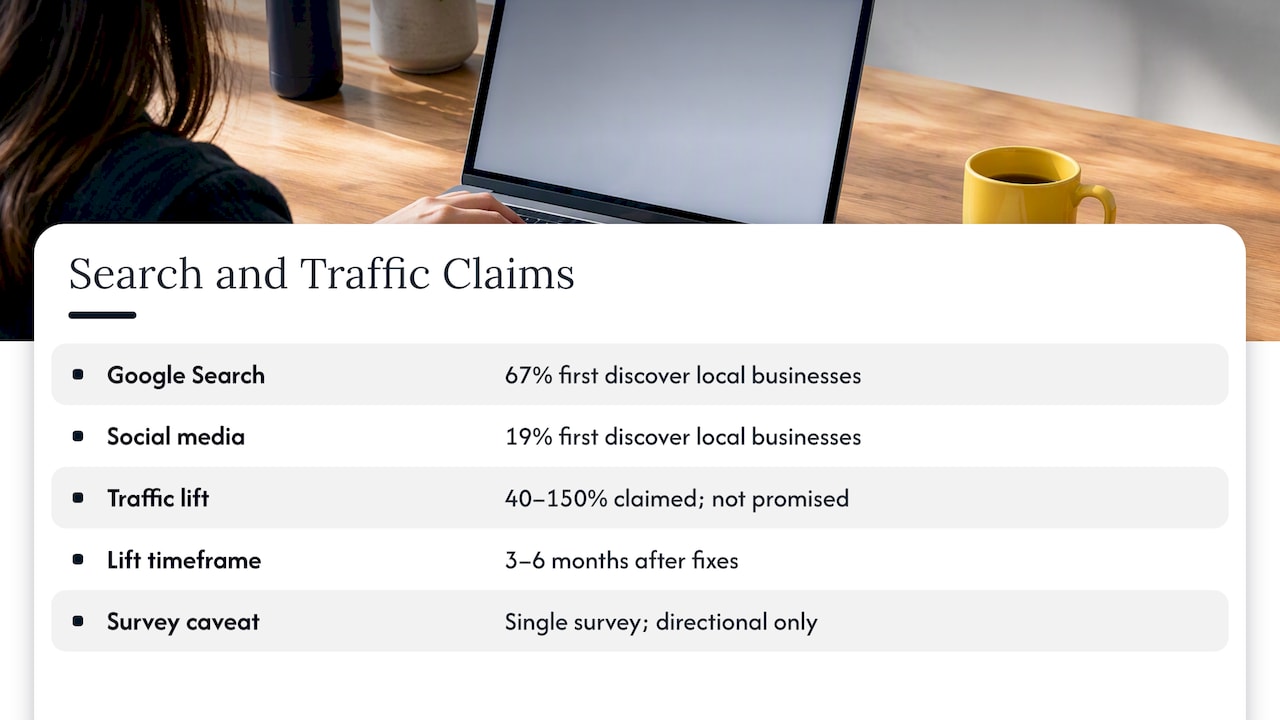
Search is where many of your prospects start. One Singapore report puts the share of consumers who first discover local businesses through Google Search at 67%, against 19% for social media. Treat it as directional, since it is a single published survey and consumer behavior differs from B2B buying. But the logic holds for service firms: people check you out online before they ever call.
The same source claims that audit-led fixes can lift organic traffic by 40 to 150% within three to six months. I would not promise any figure like that to you. Results depend on where you start. What I will say is that most sites have a handful of fixable problems that nobody has looked at, and finding them is the cheapest gain available.
But traffic is only half the story. If you already get visits and few enquiries, more traffic just gives you more of the same. That is a conversion problem, and it is usually a message problem.
Start with a baseline
You cannot tell whether optimization works without a starting point. Before changing anything, write down these numbers for the last 90 days:
- Monthly sessions to the homepage and to your top three service pages
- Number of enquiries (form, call, WhatsApp, email) and where each came from
- Share of enquiries you would actually want to take on
- Share of enquiries that opened with “how much?” and went quiet after your reply
- Average time from first visit to enquiry, if you can see it
The fourth number is the one most firms skip. It is the clearest sign of price-shopping, and it tells you whether your homepage is attracting the right people or merely many people.
If you want a quick sense of what a modest improvement could be worth, our ROI calculator lets you plug in your own traffic and deal value.
The monthly routine (about two hours)
Keep this small enough that you will actually do it. Put it in the calendar on the same day each month.
1. Check technical health
Open Google Search Console and look at the Core Web Vitals report. It is built on real-world usage data from actual visitors, which is more honest than a score you generate by testing from your own laptop on office Wi-Fi. Google’s published targets for a good experience are Largest Contentful Paint within 2.5 seconds, Interaction to Next Paint under 200 milliseconds, and Cumulative Layout Shift below 0.1. Google also says meeting them supports, not guarantees, search performance.
Then do the plain checks: submit your own contact form, click your phone and WhatsApp links on a real phone, and scan for broken links on key pages.
2. Read how people behave
Look at three things on the homepage: where visitors scroll to, what they click, and where they leave. You do not need a fancy tool. Your analytics plus a free session-recording or heatmap tool is enough for a first look.
Note one question per month, for example: “Do people click the main call to action, or do they go straight to the Pricing page?” Then you have something to act on.
3. Review your last ten enquiries
Read them line by line. What words did people use to describe their problem? Which ones were a good fit? Which were not, and what on the homepage might have attracted them?
This is free research and it beats any benchmark. Our post on lead qualification questions and homepage rules covers how to turn this into a filter.
4. Make one change
One. Choose the highest-impact fix you found, make it, and write down the date. If you change six things at once, you will not know which one worked.
The quarterly review (half a day)
Every three months, step back from the numbers and ask harder questions.
- Does the headline still describe who you help and what outcome they get? If a stranger could not say it back in one sentence, it needs work.
- Is the proof current? Old testimonials, logos of clients you no longer serve, and case studies that predate your current offer all weaken trust.
- Is the next step clear and low-risk? Visitors who are not ready to book a call need a smaller step. Our guide to service call-to-action examples and copy shows how to write them.
- Does the page work on a phone? Many first visits happen there. See how to replace a weak mobile hero and CTA in hours.
- Is it written from the customer’s point of view? Pages that talk about “we” more than “you” read as self-centered. We cover this in customer-centric copy for service businesses.
At this point also check privacy basics. If you collect personal data through cookies, forms or analytics, Singapore’s PDPC expects clear consent policies covering how consent is obtained, managed and withdrawn. If your cookie notice or privacy page predates your current tools, update it. For anything legally specific, ask your lawyer or your data protection officer.
A sensible order of priorities
Most optimization advice is a flat list of 9 or 10 tactics. That is not much help when you have two hours. Here is the order I use.
| Priority | Area | Typical symptom | Example fix |
|---|---|---|---|
| 1 | Site works | Slow pages, broken forms | Compress images, repair form routing |
| 2 | Message clarity | High bounce on homepage, vague enquiries | Rewrite headline and first screen around one client type and one outcome |
| 3 | Proof | Visitors read, then leave without enquiring | Move a relevant case result next to the main call to action |
| 4 | Next step | Clicks on the CTA but few submissions | Shorten the form, state what happens after submitting |
| 5 | Visual hierarchy | Eye jumps around, nothing stands out | Reduce competing elements, increase contrast on the primary action |
| 6 | Testing | Steady traffic and stable baseline | Compare two headlines over several weeks |
Notice testing comes last. It is the tool people reach for first and the one that helps them least.
Do not start with A/B testing
A/B testing needs enough visitors to tell a real difference from random noise. One Singapore practitioner recommends that sites under about 2,000 monthly sessions focus on one-off diagnostic fixes rather than split tests, because a small site will not produce a result you can trust. I agree, and I would go further: many B2B service sites with long sales cycles never reach the volume needed.
What do you do instead?
- Compare before and after over a long enough window (six to eight weeks), and note any seasonality or campaign changes.
- Watch enquiry quality, not just count. Five good-fit enquiries beat fifteen price-shoppers.
- Run message tests outside the site: change the headline in an email, ad or LinkedIn post and see which wording earns replies. We outline several message testing methods with channel checklists.
- Show the page to three people from your target audience and ask them what you do and what they would click next. Five minutes, no software.
Optimize for people, not for tools
A trap with ongoing optimization is chasing scores. Google’s own guidance says to create helpful, reliable, people-first content and to give visitors a good page experience overall rather than focus on one or two aspects. It also notes that third-party SEO tools and services cannot see Google’s internal ranking data and cannot guarantee results. That is worth remembering when a vendor promises page one in a fixed number of weeks.
A good test for any recommended change: would this help a first-time visitor decide faster? If the answer is only “it improves a score”, it goes to the bottom of the list.
The pricing question
Price-sensitive leads are the complaint I hear most from service owners. Many assume the answer is to hide prices or to lower them. Neither is reliable.
What works better is to help the right visitor self-select. State who the service is for, what it typically involves, and give a range or a starting point where you can. Describe what is included, and be equally clear about what is not. A visitor who sees that you are a premium option and still contacts you has qualified themselves. One who does not was never going to buy.
This is a tradeoff, not a rule. Some firms genuinely cannot publish prices because scope varies too much. In that case, publish the factors that move the price and an example project.
Perspective: what we see after the diagnosis
We built Hockworks around one observation: most service firms do not have a traffic problem. They have a decision problem. The visitor arrives, cannot quickly tell whether you are the right fit or worth the premium, and goes to a competitor whose page was easier to read.
That is why we treat the website as a decision system rather than a brochure. Every section should answer the question a prospect has at that moment in their thinking, in the order they have it. When we diagnose a homepage, we look for friction points where the visitor stalls, and we combine that with the language customers use when they describe their own problem.
Here is the part that is less common in this industry: we do not think the answer is usually a redesign. A redesign is expensive, slow and risky, and it often moves the same unclear message into a prettier layout. A blueprint that fixes the message, proof placement and calls to action lets you improve what you have. Then ongoing optimization becomes small, informed adjustments rather than guesswork.
If you take one idea from this article, take that one: clarity first, tools second.
— Fadly
When to bring in outside help
You can run the monthly routine alone. Outside help makes sense in a few situations:
- You have traffic but cannot explain why visitors do not enquire.
- Your enquiries are mostly price-focused and you do not know what on the page invites that.
- You have been looking at the same homepage for years and cannot judge it fresh.
- You want a plan your team can carry out, without a full rebuild.
What to look for in whoever you hire: they should start with diagnosis, show you what they found, and explain the reason behind each recommendation. Be wary of anyone who proposes a redesign before they have examined your enquiries, or who guarantees rankings or conversion numbers.
How Hockworks can help
If your homepage is the bottleneck, our blueprint approach is built for it. We diagnose where visitors hesitate, run a positioning workshop, capture the language of your customers, and deliver a structured plan with a video walkthrough so your team can implement it.
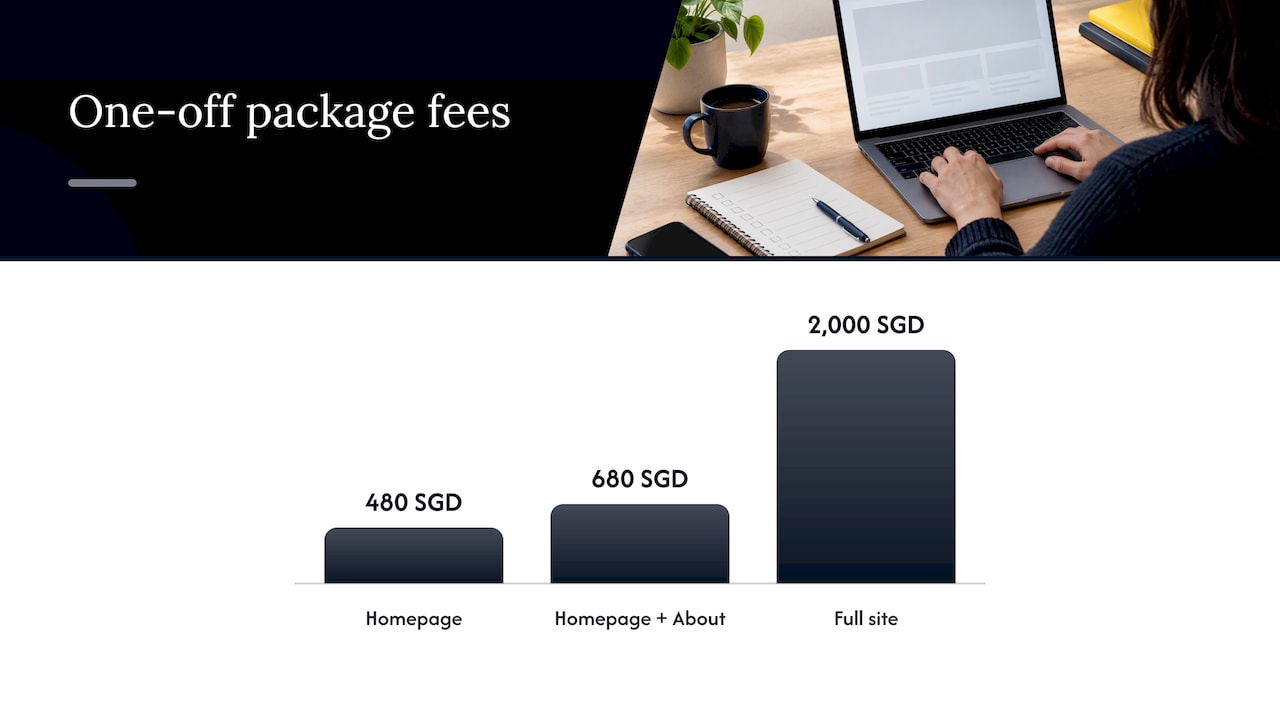
Published one-off fees, as listed on our pricing page:
| Package | Fee |
|---|---|
| Homepage | 480 SGD one-off |
| Homepage + About | 680 SGD one-off |
| Full site | 2000 SGD one-off |
| Monthly retainer for ongoing optimization | from 1200 SGD per month |
Service pages and implementation support are also available; ask us for details. If you want a first look before committing, request the free website review. To see how we think about the page itself, read about the website as a decision system.
Our approach suits established service businesses selling work worth over $2,000 that already get traffic. It is not designed for startups still validating an offer or for e-commerce stores.
A 90-day starter plan
If you want a concrete schedule, use this one.
Month 1: baseline and cleanup. Record the numbers from the baseline section. Check Search Console, test every form and link, and fix anything broken. Read your last ten enquiries and write down the five most common phrases customers use.
Month 2: clarity. Rewrite the first screen of your homepage using customer language: who it is for, what outcome they get, one clear next step. Add one piece of relevant proof next to the main call to action. Leave it alone for six weeks.
Month 3: measure and decide. Compare enquiry volume and quality against your baseline. Ask whether the proportion of price-first enquiries changed. Pick the next friction point and repeat the cycle.
After the first loop, you will know more about your own site than most competitors know about theirs.
FAQ
How often should I optimize my website?
Run a short check every month and a deeper review every quarter. Make one meaningful change at a time so you can tell what moved the numbers. Bigger shifts, such as a repositioning, deserve a six to eight week observation window.
Is ongoing optimization the same as SEO?
No. SEO focuses on being found in search, while conversion optimization focuses on what visitors do once they arrive. They overlap in areas like page speed and clear content, but a site can rank well and still convert poorly. For service firms with existing traffic, the conversion side often pays back faster.
Do I need a monthly retainer?
Not always. Many firms get more value from a one-off diagnosis and plan, then run the monthly routine in-house. A retainer fits when you want someone accountable for the cycle and you have the traffic and bandwidth to act on regular recommendations.
What should a website optimization plan include?
A baseline of current numbers, a ranked list of friction points, one change per cycle with a date and an expected effect, and a review date. It should also name who is responsible for each step. A plan that cannot be carried out by your team is a report, not a plan.
Can I measure results with a small website?
Yes, but not with split tests. Use before-and-after comparisons over several weeks, track the quality of enquiries, and gather qualitative feedback from real prospects. That is slower than a test dashboard but more honest at low volume.
Sources
- Why 67% of Singapore Consumers Find Your Business on Google (Singapore Local News)
- Core Web Vitals report (Search Console Help)
- Understanding Core Web Vitals and Google search results (Google Search Central)
- Creating helpful, reliable, people-first content (Google Search Central)
- Google Search’s guidance on third-party SEO tools and advice (Google Search Central)
- Personal Data Protection Commission Singapore, consent guidance
- Website Maintenance and Optimization (Major Tom)
- Conversion Rate Optimisation Singapore (Terris)