
Homepage Microcopy Replaces “Submit” With Clearer Service Buttons
Learn how service businesses can prioritize homepage tasks, write buttons that name outcomes, and add accessible form labels to guide visitors to act.

Written by Thiam Hock NgFounder
15 min read
Homepage microcopy is the tiny, functional text, button labels, form hints, error messages, and tooltips, that guides visitors through the page. The single most important rule is clarity: signpost the top 1 to 4 tasks you want visitors to complete, and label each one with the outcome it leads to, not a vague verb.
TL;DR:
- Use homepage analytics and sales or support questions to identify the 1 to 4 visitor tasks that matter most, then label links by outcome.
- Nielsen Norman Group cites studies reporting conversion gains above 17% from effective microcopy; specific labels should attract the right intent, not just clicks.
- WCAG 2.2 requires persistent visible field labels and instructions, with format rules stated before submission; color alone cannot identify required fields or errors.
- Test one change at a time, set the sample size or duration in advance, and judge clicks alongside task success and lead quality.
- Pair each contact or payment CTA with reassurance, and write errors as clear repairs, such as naming the missing field or valid format.
Table of Contents
- What Counts as Microcopy on a Homepage
- Why Microcopy Shapes Scanning Behavior and Conversions
- Microcopy Goals and the 3 C’s: Inform, Influence, Interact
- Prioritizing the Top 1 to 4 Homepage Tasks
- Microcopy Patterns You Can Adapt Today
- Writing Accessible Labels and Instructions
- Measuring Whether Microcopy Changes Actually Work
- Eight Steps to Improve Your Homepage Microcopy This Week
- How We Read Microcopy When We Diagnose a Homepage
- Get a Second Set of Eyes on Your Homepage
- FAQ
- Sources
What Counts as Microcopy on a Homepage
We think of microcopy as the smallest unit of UX writing on a page, usually fewer than three sentences, built to inform, influence, or help someone interact with a single element. It includes CTA buttons, navigation labels, form hints, error text, tooltips, and the small reassurance lines under a submit button.
Microcopy differs from short-form copy (a hero headline or value proposition, usually a short passage built to sell an idea) and long-form copy (service descriptions, About page narratives, blog content). Short-form and long-form copy persuade. Microcopy directs. A visitor reads a headline to decide if they’re in the right place, then reads microcopy to figure out what to click next.
On a typical homepage, microcopy shows up in predictable spots:
- The hero CTA button, where the label decides whether someone clicks or scrolls past.
- Navigation links, which need to signal destination, not just category.
- Feature tiles or service cards, where a short “Learn more about X” beats a generic “Learn more.”
- Search bars or filters, where placeholder text sets expectations for what to type.
- Forms, where labels, hints, and error messages determine whether someone finishes or abandons.
Getting this right matters more on a homepage than almost anywhere else on a site, because it’s often the only page a new visitor gives a real chance.
Why Microcopy Shapes Scanning Behavior and Conversions
Visitors don’t read homepages top to bottom. They scan, and in that scan, microcopy is frequently the most-read content on the page, because it sits exactly where a decision needs to be made: on a button, next to a form field, beside a price.
That’s why the wording carries disproportionate weight. Nielsen Norman Group research notes that effective microcopy has been shown to increase site conversions, with some studies suggesting improvements of over 17%. A single rewritten button label or clarified form hint can move the needle more than a full visual redesign, because it removes a moment of hesitation at the exact point someone decides to act or leave.
Part of this comes down to information scent, the degree to which a label predicts what happens next. A button that says “Submit” gives almost no scent. A button that says “Get my free quote” tells the visitor precisely what they’ll get and what it costs them (nothing). Weak scent doesn’t just lose clicks, it also lowers the quality of the clicks that do happen, because visitors who guess wrong end up in the wrong flow, frustrated, and less likely to convert even if they technically reach a form. Specific labels filter for the right intent, not just more volume.
Microcopy Goals and the 3 C’s: Inform, Influence, Interact
Before writing a line of microcopy, we ask what job it’s doing. Nielsen Norman Group frames this as three goals: Inform, Influence, or Interact.
Inform means the copy explains something, like a tooltip clarifying what a field requires. Influence means it nudges a decision, like a reassurance line under a pricing CTA (“No credit card required”). Interact means it enables an action directly, like a button label or a form submit prompt. Most homepage microcopy leans toward Interact or Influence, since the page’s job is to move someone toward a decision, not to educate at length.
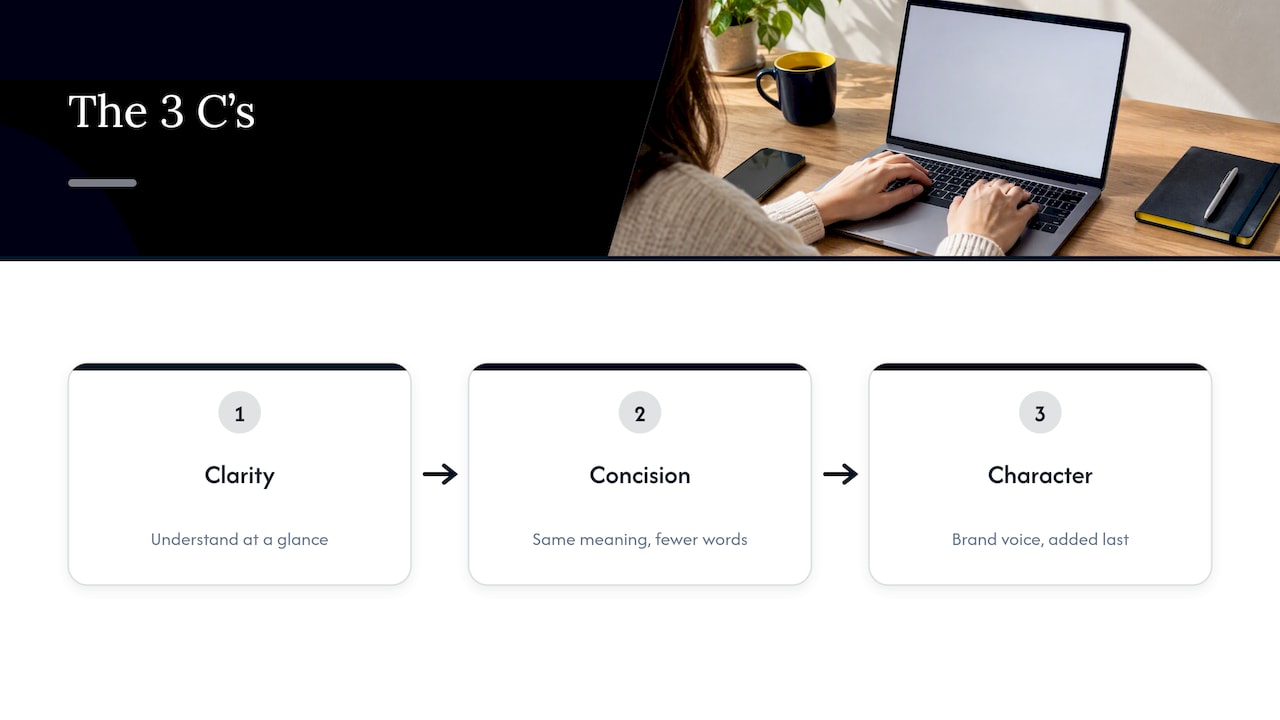
Once the goal is clear, the 3 C’s set the writing priority. Clarity comes first: can a visitor understand the copy at a glance, with zero prior context? Concision comes second: can the same meaning be said in fewer words? Character comes third, the personality or brand voice layered on top, but only once clarity and concision are already solid.
Here’s where teams go wrong: they chase character first, aiming for a clever or quirky button label, and clarity suffers. A button that says “Let’s do this!” might feel energetic, but it tells a visitor nothing about what happens next. Save the personality for copy that doesn’t carry weight on the conversion path, like a 404 page, and keep CTA labels plain and specific.
Prioritizing the Top 1 to 4 Homepage Tasks
A homepage that tries to speak to every visitor about every service usually speaks clearly to no one. The fix starts with identifying the top 1 to 4 tasks a visitor is most likely trying to complete, using analytics (which pages get clicked most from the homepage) and qualitative signals (what prospects actually ask in sales calls or support chats).
Once those tasks are clear, signposting does the rest. Visitors scan left to right and expect the first word or two of a link or button to tell them what it leads to, a pattern sometimes called the first-two-words strategy. “View pricing” scans faster than “Click here to view our pricing options.” Generic CTAs like “Get Started” or “Learn More” are a common failure point here: NN/g research warns that these phrases carry almost no information scent and can send visitors into flows they didn’t expect, which increases bounce and drop-off.
Where each type of microcopy belongs:
- Hero section: one CTA, worded around the single most valuable next step (a quote, a review, a calculator).
- Navigation: outcome-oriented labels over category labels, like “See pricing” instead of just “Pricing” when space allows.
- Feature tiles: a short line that names a result, not a feature, paired with a specific “Learn more about [X]” link.
- Forms: labels that state exactly what’s being asked, with hints placed where confusion is likely, not everywhere.
Treat the homepage as a short list of doors, not a brochure. Every piece of microcopy should point toward one of those doors clearly enough that a tired visitor on a phone screen doesn’t have to think twice.
Microcopy Patterns You Can Adapt Today
Most homepage microcopy falls into a handful of repeatable patterns. Swapping in the right one is often faster than writing from scratch.
Button labels. Replace vague verbs with the outcome the click delivers:
- Instead of “Get Started,” try “View pricing plans” or “See how it works.”
- Instead of “Submit,” try “Send my request” or “Book my slot.”
- Instead of “Learn More,” try “Compare service tiers” or “See client results.”
Each of these answers the unspoken question before the click: what happens if I press this? That’s the core idea behind replacing generic CTAs with language tied to a visible result.
Form hints and inline errors. Good hints appear before someone makes a mistake, not after. “Use the email you check most often” beats a blank field with no guidance, and a hint like “Format: include your area code” prevents an error before it happens. When an error does occur, tell people how to fix it rather than just flagging that something’s wrong:
- Weak: “Invalid input.”
- Better: “Enter a valid email, like name@example.com.”
- Weak: “Error.”
- Better: “This field can’t be empty. Add your company name to continue.”
Reassurance and disclaimers. The line beneath a CTA often does more conversion work than the button itself, because it answers the objection a visitor hasn’t voiced yet. “No obligation, we’ll respond promptly” removes the fear of a hard sales pitch. “Cancel anytime” removes commitment anxiety. If a CTA leads somewhere time-limited or conditional, a short disclaimer (“Limited availability this month”) sets accurate expectations rather than creating a bait-and-switch feeling once clicked.
A useful habit: write the button label and its supporting microcopy together, as a pair, so the reassurance line always answers the specific hesitation that button is most likely to trigger. For teams testing form tools to manage these flows, comparisons like Typeform versus Jotform are worth a look when deciding where input hints and inline validation live technically. For more structured examples built around service businesses specifically, our call-to-action examples and sizing guidance walks through button wording alongside tap-target sizing.
Writing Accessible Labels and Instructions
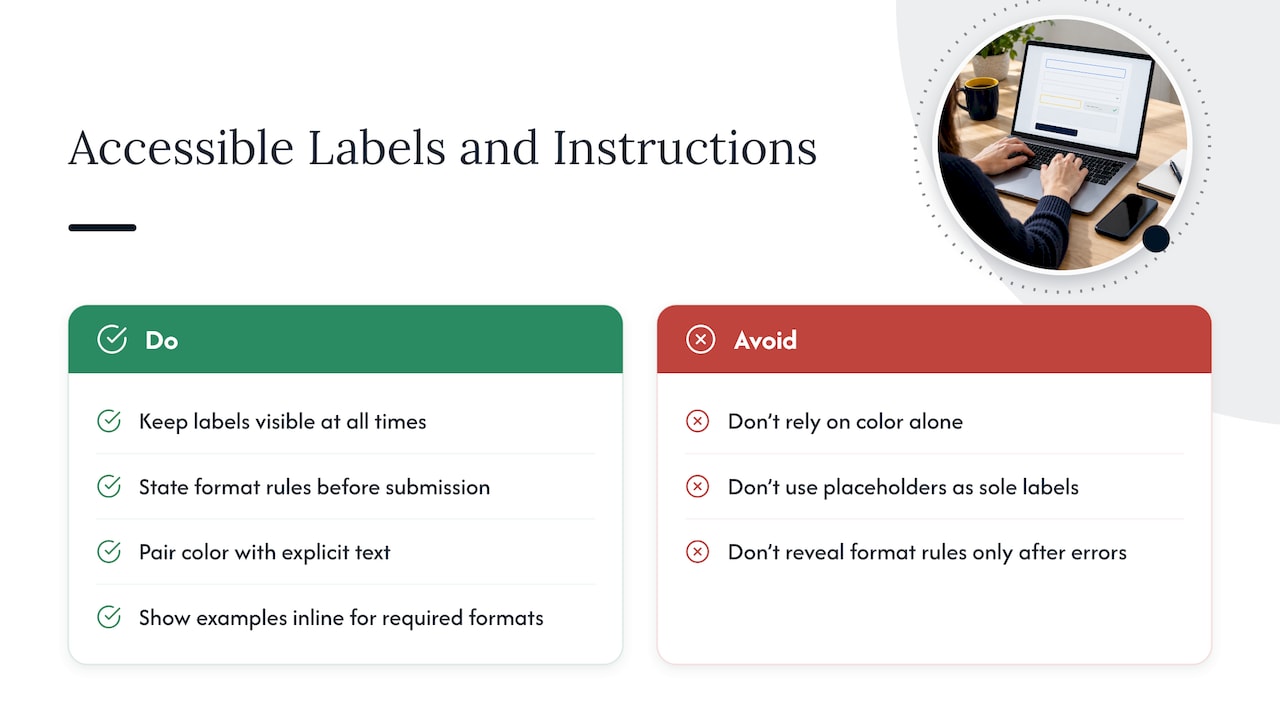
Clear microcopy and accessible microcopy are the same job, not two separate tasks. WCAG 2.2 Success Criterion 3.3.2 requires that form fields have persistent, visible labels or instructions, and that any specific format requirement (a date format, a password rule, a phone number pattern) gets stated before submission, not only after an error appears.
A few concrete practices follow directly from that standard. Never rely on color alone to mark a required field or an error state. Add an asterisk, the word “required,” or explicit error text alongside any color change. When a field expects a specific format, show an example inline, like “enter the date in the format shown,” rather than making someone guess and fail first. Keep labels visible at all times rather than using placeholder text as the only label, since placeholder text disappears the moment someone starts typing, taking the instruction with it.
Longer instructions, like detailed password requirements, can be tucked behind a focus state or a small info icon rather than always visible, as long as they appear the moment the field is active. ARIA attributes like aria-describedby can tie that instruction text to the field programmatically for screen reader users, so the connection isn’t just visual. The goal in every case is the same one clarity serves everywhere else: nobody should have to guess, retry, or scroll back up to understand what’s being asked of them.
Measuring Whether Microcopy Changes Actually Work
Microcopy feels subjective until you measure it, so track a small set of metrics tied directly to the change you made. For a button label, watch click-through rate on that specific element. For a form, watch completion rate and where drop-off happens field by field. For the homepage overall, watch task success (did visitors reach the page their click implied) and conversion quality, meaning whether the enquiries coming through are a good fit, not just more numerous.
Run one change at a time. Testing a new CTA label and a new hero image in the same experiment makes it impossible to know which one moved the result. Decide on a sample size or test duration before launching, not after glancing at early numbers, since early swings in A/B tests are often noise rather than signal.
When a result surprises you, qualitative tools explain the why that numbers alone can’t. Session replays show whether visitors hesitate, scroll back, or hover over a label without clicking. Short micro-surveys (“What were you expecting when you clicked this?”) catch mismatches between what a label promises and what the page actually delivers. A CTA that technically gets more clicks but sends the wrong-fit visitors into a form is not a win, even if the raw click-through number looks good.
Eight Steps to Improve Your Homepage Microcopy This Week
A focused microcopy pass doesn’t need a redesign. It needs a short, disciplined process:
- List every piece of microcopy on the homepage: buttons, nav links, form labels, hints, errors, disclaimers.
- Tag each item by its goal (Inform, Influence, or Interact) and whether it touches one of your top 1 to 4 tasks.
- Rewrite top CTAs to name the outcome, not the action (“View pricing” over “Click here”).
- Add persistent, visible labels and format hints to every form field, per WCAG 3.3.2.
- Add a short reassurance line under any CTA that asks for contact details or payment.
- Rewrite error messages to tell visitors exactly how to fix the problem.
- Launch one A/B test per change, with a defined sample size or run time set in advance.
- Watch session replays for the tested elements and schedule a 2 to 4 week check-in to decide what to keep.
Pro Tip: Start with the single highest-traffic button on the homepage, usually the hero CTA, since a small improvement there compounds across every visitor who lands on the page.
Our messaging hierarchy framework breaks this same process down further for teams that want a repeatable structure across future homepage updates.
How We Read Microcopy When We Diagnose a Homepage
We treat microcopy as a symptom, not a starting point. Before rewriting a single button, we look for where visitors actually hesitate: unclear positioning, buried proof, or a page that never tells a visitor which of the 1 to 4 real tasks it wants them to do.
When the wording itself is the friction, we fix labels, hints, and reassurance lines directly. When the root cause is structural, microcopy fixes get paired with signposting changes and proof placement adjustments, because a clearer button on a confusing page still underperforms.
Get a Second Set of Eyes on Your Homepage
If you’ve rewritten your CTAs and form hints and conversions still feel off, the issue is often upstream of the microcopy: positioning that’s too broad, proof that’s buried, or a homepage trying to serve too many audiences at once. That’s the kind of friction a quick audit tends to catch faster than another round of A/B tests.
Our free website review looks at exactly these friction points and tells you where visitors are most likely to hesitate before they ever reach your forms. For teams ready to go further, a Homepage Restructure plans the messaging, proof placement, and CTA wording, including the microcopy decisions covered here, and puts the changes into your current site.
- Request a free website review to flag decision-friction points on your current homepage.
- Ask about a Homepage Restructure for a full messaging and microcopy plan. It’s quoted after a free Clarity Call, and every price is on our pricing page.
- Use our ROI calculator to see what fixing these friction points could be worth to your enquiry volume.
FAQ
What is an example of microcopy?
A button labeled “View pricing plans” instead of “Click here” is microcopy, since it’s a short, functional piece of text guiding a single action. Other examples include a form hint like “Format: name@example.com” or a reassurance line like “No obligation, we’ll respond promptly.”
How do you create microcopy?
Start by naming the goal of the specific element, whether it’s to inform, influence, or enable interaction, then write for clarity first, concision second, and personality last, following the 3 C’s framework. Test the label against one question: does this tell a visitor exactly what happens if they click or fill it in?
What is the size of microcopy?
Microcopy is generally defined as text under three sentences, covering things like button labels, tooltips, and error messages, as distinct from short-form copy like headlines or long-form copy like service pages, per NN/g’s sizing breakdown. The exact word count varies by element, but a button label is usually just a few words, and a form hint rarely exceeds a single short sentence.
What does “UX copywriter” mean?
A UX copywriter is someone who writes the functional text inside a product or website, including buttons, labels, error messages, and onboarding hints, with the goal of guiding behavior rather than persuading through long-form messaging. The role sits closer to product and design than to traditional marketing copywriting, since the writing has to work within the constraints of a specific interface element.