
Booking Page Best Practices for Service Businesses
How to build a booking page that earns right-fit enquiries: what goes above the calendar, how many fields to ask for, and where to place the link.

Written by Thiam Hock NgFounder
17 min read
A good booking page does one job: it helps a serious prospect say yes with the least effort, and it quietly lets the wrong prospect self-select out. It states what the call is, shows real availability, asks for the minimum, adds one piece of proof, and loads fast on a phone. Everything else is decoration.
I see the same pattern again and again with service businesses selling work worth thousands of dollars. The homepage does its job, the visitor clicks “Book a call”, and then the booking page undoes it. A vague title, an eleven-field form, a calendar that takes six seconds to appear. This guide covers how to fix that, with examples you can copy, and where the link to the page should sit.
TL;DR
- Treat the booking page as a decision step, not an intake form. Say what the call is, who it is for and what happens next, above the calendar.
- Ask for name, contact details, the service of interest and a short message. Move everything else to the confirmation email.
- Never force account creation before booking. Baymard reports that 24% of users abandon when forced to register.
- Keep the widget light. Slow scripts push you past the 200 ms Interaction to Next Paint threshold, and phones suffer first.
- Put the booking link in the header, the hero and after proof, and put a phone number beside it for people who prefer to call.
Table of Contents
- Start with the job of the page
- What goes above the calendar
- Keep the form short
- Show real availability, fast
- Speed: the widget is usually the problem
- Booking link placement
- Displaying your phone number
- Booking page examples you can copy
- Data, consent and privacy in Singapore
- Our view: friction is a filter, but only the right kind
- A short audit you can do today
- When the problem is upstream
- FAQ
- Sources
Start with the job of the page
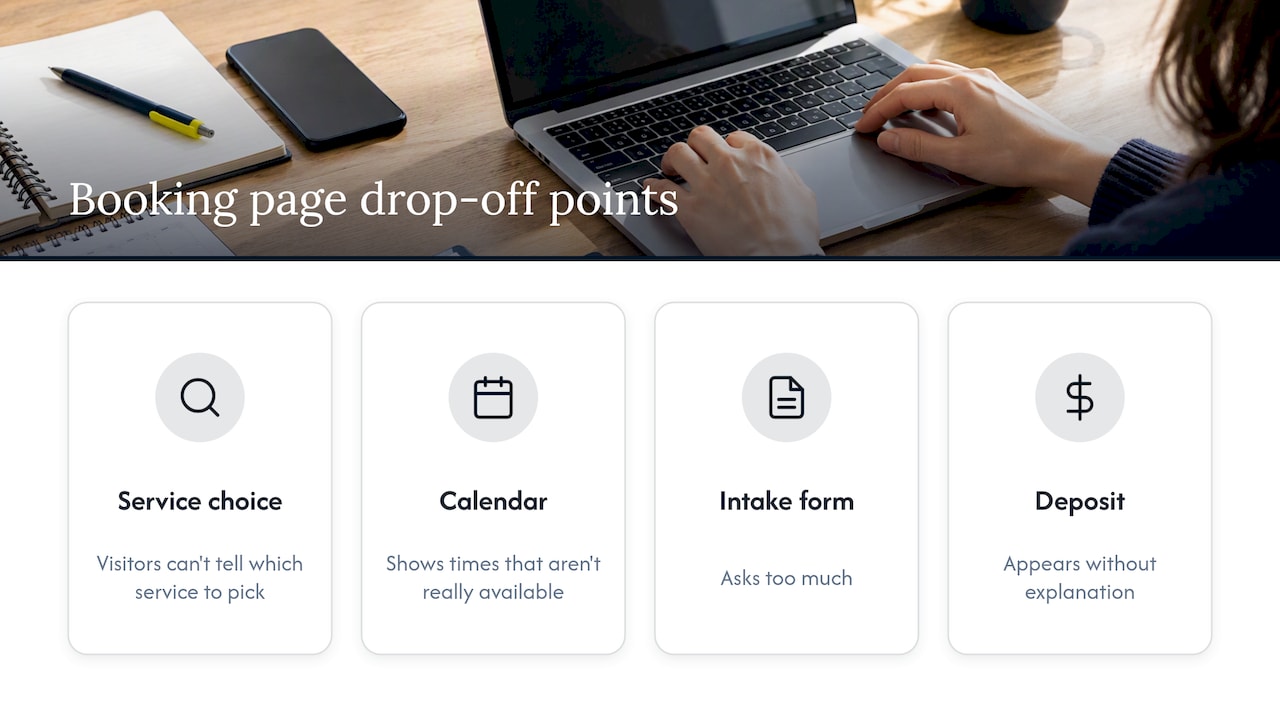
Most owners think of a booking page as a utility: collect details, save time later. That framing is the root of most bad booking pages. Faster argues that booking pages lose people at four predictable moments: when the visitor cannot tell which service to pick, when the calendar shows times that are not really available, when the intake form asks too much, and when a deposit appears without explanation.
I would put it differently, in the way I put it to clients: the booking page is a decision system. By the time someone lands on it they have a question left, and it is rarely “which slot?” It is “is this worth my time, and what happens if I click?” A page that answers that quickly gets the booking. A page that only offers a calendar leaves the answer to chance.
This matters more when you sell higher-ticket services. A buyer weighing a project worth several thousand dollars is sensitive to effort and to signs of carelessness. Every extra field reads as either admin you will put them through later or a sign that you do not know how to run a sales process. Premium buyers leave quietly. You never see them in your analytics as anything but a drop-off.
Your Web Team makes a similar point: if your business depends on consultations, estimates or demos, the booking page is a sales page with a calendar attached. Write it like one.
What goes above the calendar
The calendar is the least persuasive part of the page. The space above it is where you win or lose the visitor. Put these four things there, in this order.
1. A plain name for the meeting
“Book a call” tells nobody anything. Compare it with “30-minute diagnostic call for firms that already get traffic but few good enquiries”. The second tells the right visitor they are in the right place and tells the wrong one to look elsewhere. Both outcomes are good for you.
Name the length, the format (video, phone, in person) and who it is with. If the person on the call is the one who will do the work, say so.
2. Who it is for, and who it is not for
One short sentence of qualification does more than five form fields. Something like: “This call suits owners of established service businesses who already have steady website traffic. If you are still validating your offer, our guides will help more.” It feels candid, which is exactly the tone that attracts buyers who value expertise over a cheap quote.
If you want a deeper look at qualifying without interrogating, our piece on lead qualification questions and CRM rules walks through what to ask and when.
3. What happens on the call and after it
People book when the next step is predictable. Three lines are enough:
- What we will cover in the call.
- What you should have ready, if anything.
- What you get afterwards (a written recommendation, a quote, a next-step plan) and by when.
This also reduces no-shows, because the visitor knows the call has a purpose and an outcome.
4. One piece of proof
Not a wall of logos. One specific result, one short testimonial from a client who looks like the visitor, or one credential that matters in your field. Place it next to the calendar, not three screens below it. Weak or generic proof is worse than none, so if you cannot back a claim, leave it out.
Keep the form short
This is the single most reliable fix. Baymard’s research on forms finds that the average checkout has roughly twice as many fields as necessary, and it recommends asking how you can reduce the number of fields a user must consider, rather than polishing the layout of a long form. Checkout is not a booking form, but the behavior is the same: each field is a small decision the visitor has to make before getting what they came for.
For a service business, I would start with this:
| Field | Keep? | Why |
|---|---|---|
| Name | Yes | You need it to address them |
| Yes | Confirmation and follow-up | |
| Phone | Optional | Only if you genuinely call; otherwise skip |
| Service of interest | Yes, as a dropdown | Routes the call and sets expectations |
| Short message | Yes, optional | Lets serious buyers give context |
| Budget | No | Better handled by pricing signals on the page |
| Company size, revenue, tool stack | No | Ask in the confirmation email or on the call |
| Account or password | Never | See below |
Move depth to the confirmation email
Send an automated email as soon as someone books: “To make the most of our call, reply with two things: what you want to change, and what has been tried.” People who have just committed answer far more willingly than people who are still deciding. You get the same information, from the same buyers, without a barrier at the moment of highest friction.
Never make people create an account
Baymard’s data puts abandonment at 24% when users are forced to register. Their recommended fix is guest booking, with account creation offered on the confirmation step if you need it at all. For a consultation, you almost never need it.
Be careful with deposits and prices
A payment request that appears without warning breaks trust. If a deposit is part of your process, say so on the page above the calendar, with the amount and the reason. If you sell fixed-fee work, consider whether showing price ranges earlier helps the right buyers and filters the wrong ones. We cover that trade-off in four questions to ask before publishing website pricing.
Show real availability, fast
A calendar that shows slots which then turn out to be taken is one of the quickest ways to lose trust. Three habits help:
- Sync your calendar in both directions so personal and client commitments block slots automatically.
- Set buffers and minimum notice. A visitor who books a call starting in 20 minutes is a visitor you cannot prepare for.
- Show times in the visitor’s time zone, labeled clearly. In Singapore, where many service firms work with clients in Australia, India, the UK or the US, a mislabeled time zone creates the most avoidable no-shows.
Offer a fallback too. Next to the calendar, add one line: “No suitable time? Email us and we will find one.” It catches the visitor who would otherwise leave.
Speed: the widget is usually the problem
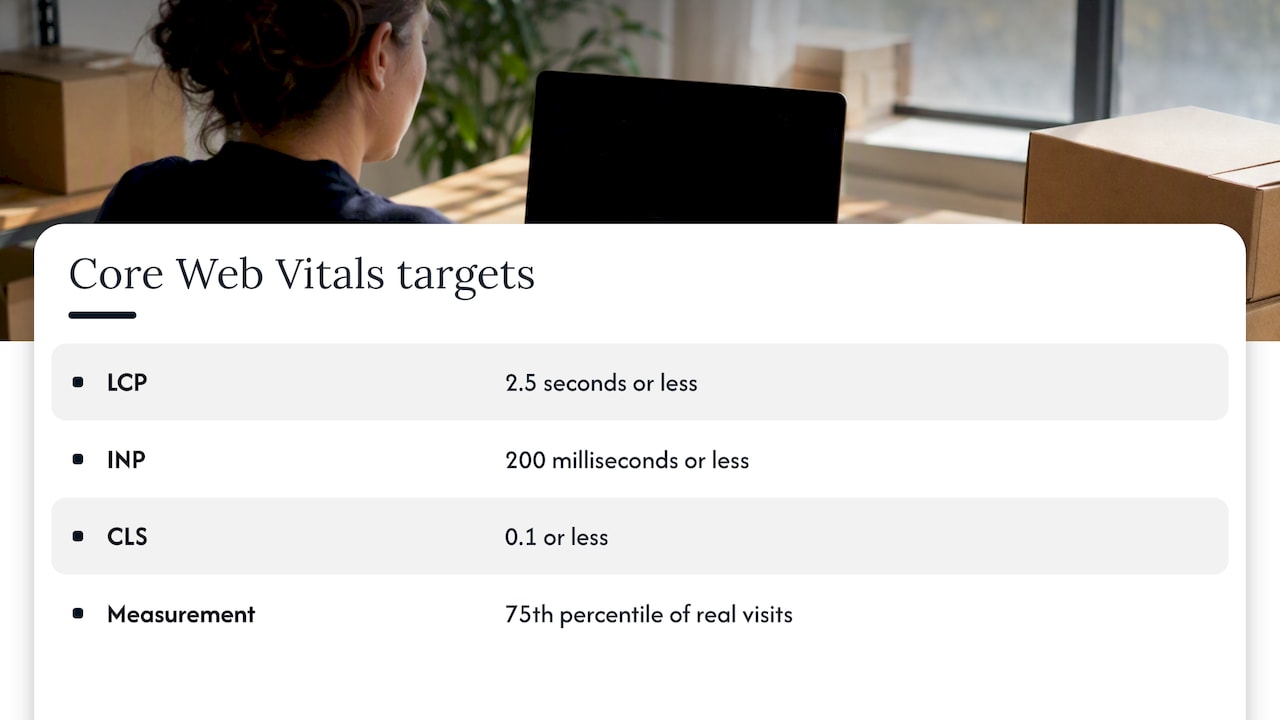
A booking page that loads slowly is a booking page that gets abandoned, and most of the weight is usually the embedded scheduler. Google’s Core Web Vitals set the targets for a good experience, measured at the 75th percentile of real visits: Largest Contentful Paint at 2.5 seconds or less, Interaction to Next Paint at 200 milliseconds or less, and Cumulative Layout Shift at 0.1 or less.
Embedded schedulers load heavy JavaScript. ALPN’s write-up on booking widgets and SEO describes how this pushes INP beyond the 200 ms mark and suggests practical fixes: replace an always-loaded widget with a button that opens it in a lightbox, or load the widget only after the visitor interacts. DebugBear’s audit of Calendly booking links shows the same issue from the other direction: even a hosted booking page can load frustratingly slowly, and it is worth seeing what is slowing it down.
A simple test: open your booking page on a mid-range phone over mobile data, not office Wi-Fi. If you are waiting for the calendar, so is your prospect. Run the page through PageSpeed Insights, and check the mobile tab first.
If you are working on this at the homepage level too, our guides on mobile homepage optimization and mobile homepage design cover the hero and call-to-action changes that feed the booking page.
Booking link placement
The best booking page fails if nobody reaches it. Placement is a decision about where visitors are ready, not about repeating a button everywhere.
- The header. One persistent, clearly worded button. A sticky header keeps it visible as people scroll, which matters on long service pages.
- The hero. The primary call-to-action should match the page’s promise. If the hero says you fix homepage conversion, the button should say what the call does, not just “Contact”.
- After proof. Right after a case study, a testimonial or a results section, visitors are at peak confidence. Put a link there.
- The end of each service page. A visitor who has read to the bottom is interested. Do not make them scroll back up.
- Thank-you and article pages. A blog reader who has just learned something from you is a warm lead. Offer the call in context, not as a pop-up.
What to avoid: five different buttons with five different labels competing on one screen. One primary action per section, with the same destination.
Displaying your phone number
Should you show a phone number next to the booking link? For most service businesses selling larger engagements, yes. Some buyers want to speak to a person before they commit, and a visible number signals that there is a real business behind the page.
A few practical rules:
- Put it in the header or footer and on the booking page itself, next to the calendar.
- Make it tappable on mobile so a visitor can call in one touch.
- Write it in the format your market expects. In Singapore, that is +65 followed by the eight-digit number.
- State the hours when someone answers. A number that rings out damages trust more than no number.
If you cannot staff the phone, offer a messaging or email alternative and say how fast you reply. Do not display a number you will not answer.
Booking page examples you can copy
I will describe structures rather than name businesses, since the layout matters more than the brand. Here are three patterns that work for service firms.
The consultation page
Headline names the call and its length. A two-line description of who it is for. Three bullets on what you will cover. One testimonial. Calendar embedded or opened by a button. Under the calendar, a note on what happens next. This suits consultants, agencies and advisers.
The clinic or appointment page
A service picker first (new patient, follow-up, specific treatment), because the wrong choice costs both sides. Practitioner name and photo, visible availability, location with a map, a reassuring note on what to bring. The visitor needs less persuasion and more clarity. For this audience our page on why clinic websites turn away ideal patients explains where hesitation tends to build.
The professional firm enquiry page
For law, accounting and similar firms, a short qualifying paragraph, a limited number of intake fields and a promise of response time. If it is a first conversation rather than a billable meeting, say it is free and confidential. See how this fits a wider site in why firm websites turn away the clients they want most.
Data, consent and privacy in Singapore
A booking form collects personal data, and in Singapore that falls under the Personal Data Protection Act. The Personal Data Protection Commission’s advisory guidelines set out a consent obligation and a notification obligation: you tell people the purpose of collection before or at the time you collect, and you obtain their consent. The guidance contemplates a notice on the page itself.
In practice: add one line under the form, such as “We use your details only to arrange and prepare for this call”, with a link to your privacy policy. If you plan to add people to a newsletter, ask separately, with an unticked box. This is general information, not legal advice. If you handle sensitive data, such as health records, speak to a data protection professional about your specific setup.
This also fits the minimal-form principle: the fewer fields you collect, the less you have to justify.
Our view: friction is a filter, but only the right kind
We get asked whether a longer form qualifies leads better. Sometimes it does, but usually at the wrong price. A long form filters out people who are short of time, and the people with the most options and the highest budgets are often short of time. The leads that remain are patient, price-comparing ones.
The better filter is clarity. Tell the visitor what the call is, who it is for and what it leads to, and the wrong people will self-select without feeling interrogated. That is how we approach a homepage as well: find the point where a serious visitor hesitates, and remove the doubt rather than adding a hurdle. If you want the thinking behind that, read about our approach and our guide to getting right-fit enquiries without a redesign.
The booking page is the last step of the same decision system. If the homepage promises one thing and the booking page says another, you lose people at the handoff. So check both together.
— Fadly
A short audit you can do today
Open your booking page and answer these honestly:
- Can a stranger tell in five seconds what the meeting is and who it is for?
- How many fields are there, and which could move to the confirmation email?
- Is there any account or password step?
- Does the calendar appear in under three seconds on mobile data?
- Is there one piece of proof beside the calendar?
- Is your phone number visible, tappable and answered?
- Is there a privacy line under the form?
- Does the confirmation email tell the visitor what happens next?
Fix the first two before anything else. They are free and typically deliver the biggest change. Then measure: record your baseline booking rate (bookings divided by visitors to the page) before you change anything, so you can tell whether the changes helped. For more on getting more good enquiries from traffic you already have, see six quick wins for right-fit enquiries.
When the problem is upstream
Sometimes the booking page is fine and the problem sits earlier. Visitors arrive, read the homepage, and never click. In that case no amount of calendar tuning helps.
That is the work we do at Hockworks: we diagnose where visitors hesitate on your homepage, clarify your positioning, and deliver a blueprint with a video walkthrough your team can implement without a redesign. The homepage blueprint is SGD 480 one-off, Homepage + About is SGD 680 one-off, and a full-site blueprint is SGD 2,000 one-off. A monthly retainer starts from SGD 1,200 per month. See the pricing page for the full list, or start with a free website review and we will tell you where we think your visitors drop off.
FAQ
How many fields should a booking form have?
As few as you can run a useful first call with: name, email, the service of interest and an optional short message. Baymard’s research finds that the average form has about twice as many fields as needed. Collect deeper context in the confirmation email, after the visitor has committed.
Should I embed the calendar or link to it?
Embedding keeps visitors on your site and feels seamless, but it can slow the page. If your embed hurts mobile speed, open it from a button or load it only after a click, as ALPN suggests. Test both on a real phone and keep the one that loads faster.
Where should the booking link go on my website?
In the header, the hero, directly after proof such as case studies, and at the end of each service page. Use the same label and destination each time. One clear action per section works better than several competing buttons.
Should I show my phone number on the booking page?
Yes, if someone will answer it. Make it tappable on mobile, write it in the +65 format for Singapore, and state the hours. Some buyers of higher-value services want to speak to a person first, and a number beside the calendar serves them without costing you bookings.
Do I need a privacy notice on a booking form in Singapore?
Yes. The PDPA requires you to notify people of the purpose of collection and obtain consent, and the PDPC guidelines allow for a notice on the page. A one-line purpose statement with a link to your policy is the usual approach. For anything complex, ask a data protection professional.
Sources
- Booking Pages That Don’t Lose Customers, Faster
- Checkout Optimization: Minimize Form Fields, Baymard Institute
- Save Account Creation for the Confirmation Step, Baymard Institute
- Web Vitals, web.dev
- How your booking widget is hurting your SEO, ALPN
- Calendly Booking Links: A Web Performance Audit, DebugBear
- Advisory Guidelines on Key Concepts in the PDPA, PDPC Singapore